QuickBooks is one of the most popular accounting platforms for small businesses. It helps manage invoices, track expenses, and stay organized. But when it comes to accepting payments, many business owners quickly discover that QuickBooks payments fees can add up faster than expected.
The good news is that businesses don’t need to stop using QuickBooks to control costs. You can keep QuickBooks for accounting while choosing a smarter, lower‑cost way to process payments.
This guide explains how QuickBooks payment processing fees work, why they often feel expensive, and how small businesses can reduce—or even eliminate—those fees without disrupting their workflow.
Understanding QuickBooks payments fees
QuickBooks Payments allows businesses to accept credit cards, debit cards, and ACH payments directly through the QuickBooks ecosystem. While the convenience is appealing, it comes with recurring costs.
Typical QuickBooks fees include:
- QuickBooks credit card fees charged per transaction
- Higher rates for keyed-in card payments and online payments
- Processing costs increase as your transaction volume and sales grow
These fees may seem manageable at first, but over time they can significantly impact profit margins—especially for businesses with frequent transactions or higher ticket sizes.
The real cost of QuickBooks payment processing fees
The biggest challenge isn’t just the rate itself—it’s the lack of flexibility.
With QuickBooks Payments:
- Rates are usually fixed and not easily negotiable
- Businesses absorb 100% of the processing cost
- There’s no built‑in way to recover or offset fees
- No cashback or rebate options exist
For many small businesses, this creates a silent drain on revenue.
That’s why many business owners search for alternatives like this:
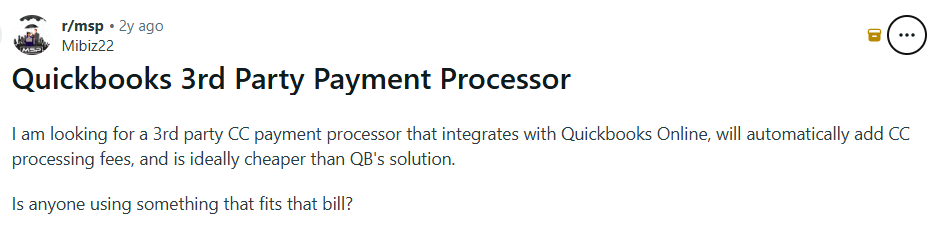
“I am looking for a 3rd party CC payment processor that integrates with Quickbooks Online, will automatically add CC processing fees, and is ideally cheaper than QB's solution. Is anyone using something that fits that bill?”
That solution does exist.
Can you avoid payment fees in QuickBooks?
You cannot eliminate fees while using QuickBooks Payments itself—but you can avoid those fees by separating accounting from payment processing.
QuickBooks does not require you to use its built‑in processor.
This means:
- You keep QuickBooks exactly as it is
- Invoices, records, and reporting stay intact
- Payments are processed through a lower‑cost, integrated solution
This approach gives you cost control without sacrificing convenience.
Smarter alternatives that integrate with QuickBooks
Small businesses don’t have to rely on QuickBooks Payments to accept card and bank payments. There are third‑party solutions that integrate directly with QuickBooks Online, allowing businesses to keep their accounting workflow intact while gaining more flexibility around how payments are processed.
At Sekure Payment Experts, we work with QuickBooks‑compatible payment tools that connect seamlessly to QuickBooks and support more cost‑effective processing options.
Chargezoom
Chargezoom integrates directly with QuickBooks Online, making it easy to accept credit card and ACH payments while keeping invoices and records automatically updated. Businesses can continue using QuickBooks as usual, without being locked into QuickBooks Payments to process transactions.
This approach helps businesses maintain a smooth payment experience while opening the door to more flexible and potentially lower‑cost processing options.
Biller Genie
Biller Genie also integrates with QuickBooks Online and simplifies how businesses manage invoicing and collections. It allows customers to pay invoices online and ensures payments are synced back into QuickBooks without manual work.
By using an integrated solution like Biller Genie, businesses can streamline payments while exploring alternatives to QuickBooks Payments and its associated fees.
Why this matters for QuickBooks payments fees
Using an integrated payment solution means businesses can separate accounting from payment processing. QuickBooks remains the system of record, while payment acceptance is handled through a setup that offers more flexibility around pricing, fee recovery, and long‑term cost control.
For many small businesses, this is the first step toward reducing QuickBooks payments fees without changing how they use QuickBooks day to day.
How to eliminate credit card fees altogether
For businesses that want to take cost savings even further, dual pricing with Edge Plus can virtually eliminate QuickBooks credit card fees altogether, all while offering you monthly cashback payouts.
How dual pricing works
- Customers see two prices: cash and card
- Card‑paying customers cover the processing cost
- Cash‑paying customers receive a lower price
- The business keeps more of its revenue
Why Edge Plus is different
Edge Plus is a compliant dual pricing model that:
- Integrates with QuickBooks‑friendly payment systems
- Removes processing costs from the business
- Offers monthly cashback payouts, creating actual returns instead of just savings
Instead of accepting processing fees as a cost of doing business, Edge Plus turns payments into a revenue‑neutral—or even positive—part of operations.
Turn processing fees into cashback
See how much you could earn each month with Edge Plus
Calculate your cashbackFinal thoughts: Are QuickBooks payments fees worth it?
QuickBooks is an excellent accounting platform—but its payment processing isn’t always the cheapest option.
If rising QuickBooks payments fees are affecting your margins, remember:
- You don’t need to leave QuickBooks
- You don’t need to change your workflow
- You simply need a better payments partner
With the right integration, businesses can significantly reduce QuickBooks payment processing fees—or eliminate them entirely.
Want to reduce or eliminate your QuickBooks payment fees?
Sekure Payment Experts helps businesses integrate smarter, lower‑cost payment solutions that work seamlessly with QuickBooks.
Reach out today to explore your options and see how much you could save.
FAQs
Are QuickBooks payments fees required to use QuickBooks?
No. QuickBooks does not require you to use QuickBooks Payments. You can continue using QuickBooks for accounting, invoicing, and reporting while processing payments through a third‑party solution that integrates with QuickBooks Online.
Can I reduce QuickBooks payment processing fees without changing accounting software?
Yes. Many businesses reduce or avoid QuickBooks payments fees by using payment solutions that integrate with QuickBooks but are not tied to QuickBooks Payments. This allows businesses to maintain their existing workflow while gaining more flexibility around processing costs.
Do Chargezoom or Biller Genie replace QuickBooks?
No. Chargezoom and Biller Genie work with QuickBooks. They integrate directly with QuickBooks Online to sync invoices and payments, allowing businesses to keep QuickBooks as their accounting system while using an alternative approach to accepting payments.
Is it possible to eliminate credit card processing fees altogether?
In some cases, yes. With compliant pricing models such as dual pricing, businesses can shift processing costs to card‑paying customers transparently, helping eliminate out‑of‑pocket QuickBooks credit card fees while remaining compliant.