Jump to:
- What is a POS and why you may need one
- POS system types and deployment options
- Must-have features for your POS
- Understanding costs, contracts, and total value
- Integrations, security, and compliance
- How to select and implement the right POS
- Matching POS features to different business models
- Feature deep dive: Payments, inventory, and reporting
- Understanding plans and pricing avoiding hidden fees
- Security essentials: Encryption, tokenization, and network hygiene
- Implementation roadmap: From pilot to go-live
- Checklist for Selecting Your POS
- Optimizing your POS as you grow
- Next steps: choosing the best POS system for your business
- Frequently Asked Questions
Are you adopting your first POS, or upgrading to a system that supports additional registers or locations? Choosing the right point of sale (POS) system is one of the most important decisions you can make for your business.
A modern POS goes far beyond accepting payments. The right POS can speed up checkout, simplify inventory management, centralize reporting, support omnichannel sales, and help protect sensitive data.
In this guide, you’ll learn why a POS matters, how different system types compare, and which features truly make an impact. We’ll also cover pricing models, hidden costs, implementation steps, and how to get the most value from your POS as your business grows. If you’re searching for the best POS system for your business, this resource will help you make a confident, informed choice.
Get matched with the perfect POS solution
Our experts will guide you for free, with zero obligation.
What is a POS and why you may need one
A modern POS is the central hub for how your business takes payments and manages sales. Instead of juggling separate tools for checkout, inventory, accounting exports, and staff oversight, your POS pulls these workflows together and keeps them consistent across the business. That integration saves time, reduces mistakes, and delivers visibility you can act on—whether you’re running a storefront, a clinic with a front desk, a salon, a studio, or a multi-location operation.
Key benefits include:
- Accurate sales tracking with item-level detail, applied taxes, and discounts, so you can measure margin and promotion impact.
- Real-time inventory updates to prevent stockouts and over-ordering, with shrink control and streamlined replenishment.
- Faster checkout with intuitive screens, barcode scanning, and quick tender options that move lines efficiently.
- Actionable reporting that surfaces daily sales, top sellers, peak hours, and staff performance in one view.
It’s time to upgrade from a basic card reader once your transaction volume grows, your catalog expands, returns become frequent, or you need location-level controls and reporting. Omnichannel sellers combining in-person, pickup, and eCommerce benefit most, because inventory, pricing, and orders stay in sync.
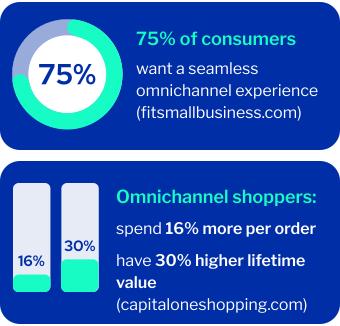
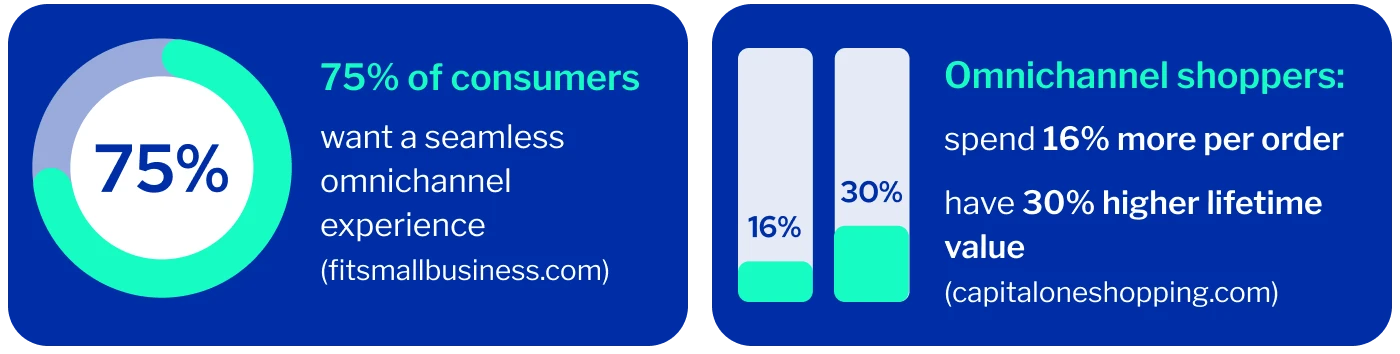
For many, that transition to omnichannel is the moment to evaluate a POS system for small business that provides unified operations and a smooth customer experience.
Security and compliance are equally important. Reputable POS providers help you meet PCI obligations with P2PE, EMV acceptance, and tokenization that removes sensitive card data from your systems. Role-based permissions, audit logs, and secure network configurations help safeguard against misuse and fraud. When buying a POS system, make sure your short list includes strong security fundamentals and clear compliance support.
POS system types and deployment options
Most businesses start by deciding on cloud-based versus on-premise systems, then choose hardware: mobile, countertop, or tablet-based. Each approach can have tradeoffs in cost, control, and flexibility. Understanding these options will help you identify the point of sale system for small businesses that fits your workflows and budget.
Cloud-based POS system
Cloud POS runs over the internet, storing data in secure vendor data centers. Advantages include lower upfront costs, automatic updates, remote access, and easy scalability. These platforms are popular with multi-location retailers, pop-ups, and teams that want rapid feature enhancements. The main considerations are reliance on connectivity and ongoing subscriptions. Many solutions offer an offline mode to keep taking payments when the network drops. If you’re comparing POS systems for small business, cloud-based platforms often deliver the fastest time-to-value.
On-premise POS system
On-premise systems run locally on your own servers or terminals. They offer full control over update timing, deeper customization, and operation independent of internet uptime. However, they often require higher upfront investment, scheduled maintenance, and in-house IT experts to manage patches, backups, and security. A POS system for small business that is on-premise can be the right fit when you need tight control and specialised integrations.
Swipe to see more →
| Feature | Cloud POS | On-prem POS |
| Upfront cost | Low | High |
| Flexibility | High | Moderate |
| Maintenance | Vendor | In-house |
| Scalability | Easy | Limited |
Cloud vs. on-premise POS reliability
Both models can be highly reliable. Cloud depends on internet connectivity and vendor uptime commitments; choose providers with strong SLAs and offline processing. On-premise depends on your local infrastructure; plan for power issues, hardware failures, backups, and disaster recovery. Evaluating these tradeoffs will help you identify a POS system for small businesses that keeps your checkout running smoothly.
Hardware factors
- Mobile POS: Smartphones or handhelds with built-in scanners and card readers are ideal for line-busting, delivery, curbside, and service providers who move with the customer.
- Countertop POS: Fixed stations with cash drawers, receipt printers, and customer displays suit busy cash wraps and high-volume checkouts.
- Tablet POS: Sleek, space-saving, and flexible; common in boutiques, salons, and studios where aesthetics and mobility matter.

Integrated bundles vs. modular builds
Pre-packaged kits combine terminals, stands, card readers, cash drawers, printers, and barcode scanners designed to work together, speeding deployment. Modular builds let you mix and match components, which can optimize budget and functionality.
Keep in mind, when you switch to Sekure to cut down your payment processing costs, we can set you up with a new POS and work with you to ensure you're getting the right setup or bundle. Whether you are getting your first POS system or upgrading, our team is here to help.
Must-have features for your POS
The best POS systems are simple at the counter and powerful behind the scenes. Focus on functions that support your day-to-day operations and growth instead of chasing long checklists that add cost and complexity.
Payments
- EMV chip technology, contactless, mobile wallets, and swipe support.
- Split tenders, tips and service charges, surcharges or cash discounting where allowed by card network rules and state law.
- Refunds, partial refunds, and exchanges with clear audit trails.
- Card-on-file and tokenized subscriptions for memberships and recurring services.
- Invoicing and remote payments if you bill offsite.
Inventory management
- Variants and modifiers (size, color, add-ons), low-stock alerts, vendor profiles, and purchase order workflows.
- Multi-location stock visibility with transfers and location-specific pricing.
- Batch and serial tracking for high-value or regulated items.
Reporting and analytics
- Daily summaries, product performance, category trends, discount impact, and tax reporting.
- Drill-down into voids, refunds, manual price changes, and staff performance.
- Exports for accounting with scheduled reports to managers.
- Real-time dashboards that highlight bottlenecks and peak hours.
Customer experience
- Loyalty programs (points, tiers, punch cards) and customer profiles with purchase history.
- Flexible receipts via print, email, or SMS.
- Gift cards, store credit, smooth returns and exchanges for retail, and more.
Operational tools
- Roles and permissions, user PINs, time clock, and shift reports.
- Offline mode with secure card capture and automatic sync when the network returns.
- Barcode label printing, bulk price updates, menu scheduling, and automated tax handling.
Understanding costs, contracts, and total value
POS pricing is more than the sticker price. Your total cost of ownership includes hardware, software subscriptions, payment processing rates, support services, and implementation. If you are narrowing down POS systems for small businesses, it often comes down to comparing real-world costs and service quality side by side.
Cost components
- Upfront hardware: terminals, tablets, stands, printers, scanners, cash drawers, mounting, and installation services.
- Monthly software: licenses per register or per location; add-ons such as loyalty, advanced analytics, gift cards, eCommerce, or online ordering.
- Processing fees: flat-rate (predictable), interchange-plus (transparent and potentially lower at scale), or tiered (sometimes harder to predict).
- Miscellaneous fees: PCI compliance fees, chargeback fees, monthly gateway or statement fees, batch fees, and higher rates for keyed transactions.
Sekure’s team can help you choose the right POS system for your business, and depending on your needs, you may also qualify for a free setup. Reach out today to explore your options and find the best solution for your business.
Implementation and support
- Catalog/menu setup, data migration, staff training, custom integrations, and on-site services.
- Support channels included (email, chat, phone), on-site dispatch, or dedicated account management.
Scalability and flexibility
- Contract terms that allow you to add registers and locations, upgrade or downgrade modules, and export your data.
- Multi-year discount agreements: review buyout clauses, hardware terms, and volume commitments that affect rates.
Providers may offer discounted or free hardware with a processing contract. This can be a strong value if the rates are competitive and the terms clear. To make sure you’re truly getting the best deal, our Rate Sekurity Guarantee® is designed to secure the lowest possible credit card processing rates for you and protect your business from hidden fees.
Integrations, security, and compliance
Integrations that eliminate manual work
Choose a POS with plug-and-play connectors for accounting, eCommerce, marketing, inventory planning, and workforce management. For retail, integrations to replenishment and warehouse tools help maintain stock accuracy. Streamlined integrations reduce double entry, improve reporting accuracy, and make audits easier. These capabilities can be a deciding factor when selecting the best POS system for small businesses that grows with you.
Security best practices
- End-to-end encryption and tokenization to minimize exposure of card data and reduce your PCI scope.
- Segregated networks: place POS devices on a separate VLAN from guest Wi-Fi.
- Strong passwords, credential rotation, and multi-factor authentication for dashboards and remote access.
- Consistent patching of operating systems, POS software, and device firmware.
- Role-based access controls and audit logs to prevent and trace misuse.
- Staff training to recognize phishing and social engineering attempts.
PCI compliance essentials
- Use EMV-capable terminals and never store raw cardholder data.
- Complete the appropriate SAQ and maintain device inventories, update logs, and incident response plans.
- Ensure your POS supports correct handling of tips, taxes, and age-restricted items.
- Choose a provider with clear compliance documentation, breach response, and ongoing security updates.
How to select and implement the right POS
Businesses exploring POS systems should start with a clear list of priorities tailored to daily tasks and long-term goals.
Define requirements
- Document sales workflows, catalog size, modifiers, discounts, fulfillment options, and reporting needs.
- Separate must-haves from nice-to-haves; rank by business impact.
- Create day-in-the-life scenarios your team will use during demos and pilots.
Evaluate solutions
- Request demos tailored to your workflows, not generic tours.
- Ask for references from businesses similar in size and sector.
- Pilot at one register or location to validate performance during real shifts.
- Test connectivity, offline mode, refunds, exchanges, tip flows, and end-of-day reconciliation.
- Time common tasks: adding products, applying discounts, counting cash drawers.
Plan the rollout
- Data migration: products, pricing, taxes, customers, suppliers; clean your catalog and standardize naming conventions.
- Training by role: cashiers on checkout, managers on reporting, administrators on configuration and security.
- Go-live support: arrange vendor assistance for busy days, and have spare hardware ready.
Sustain and optimize
- Track key metrics: transaction speed, voids, stockouts, loyalty redemption, and tip accuracy.
- Quarterly reviews to adjust permissions, refine menus or catalogs, and roll out new features.
- Assign a POS owner to manage updates, audits, and vendor communications.
Following this structured approach makes choosing a POS system smoother and ensures your POS system for small business is configured to support real-world tasks from day one.
Matching POS features to different business models
The right point of sale system for your business adapts to your vertical and scales as your operations expand.
Retail
- Robust inventory with variants, barcode scanning, gift cards, store credit, and straightforward returns and exchanges.
- Purchase order support, vendor management, reorder points, and multi-store stock transfers.
- Analytics that surface top sellers, slow movers, and discount effectiveness.
Professional services, fitness, and beauty
- Appointment booking, staff calendars, memberships and packages, and deposits with no-show fee handling.
- Integrated payments for in-session checkout or mobile payments at the chair or on-site.
- Customer profiles with visit history, preferences, and targeted loyalty offers.
Multi-location and omnichannel
- Centralized reporting, location-specific pricing, and inventory transfers.
- eCommerce integration for unified inventory, pricing, promotions, and customer profiles.
- Role-based dashboards for regional oversight and consolidated analytics.
Feature deep dive: Payments, inventory, and reporting
As you evaluate POS systems for small business, make sure your top options offer both the core functionality you need and the level of insight required to make informed decisions. Here are a few key areas to consider:
Payments
- Accept EMV, NFC/contactless, mobile wallets, and keyed or online payments for invoices and remote billing.
- Offer card-on-file for memberships and service packages with tokenized storage.
- Configure surcharge, dual pricing, or cash discounting only where compliant with card brands and state laws.
- Monitor chargebacks with alerts and procedures for evidence submission.
Inventory
- Multi-location stock levels with transfer workflows and cycle counts to maintain accuracy without shutting down.
- Supplier catalog imports, purchase orders, and cost tracking to protect margins.
- Batch/lot and serial tracking for regulated or high-value items.
Reporting
- Beyond daily sales: cohort analysis, repeat customer frequency, product affinity, basket analysis, and promo ROI.
- Shrink control via void, refund, and override monitoring with user attribution.
- Scheduled reports to owners and managers, plus clean exports to your accounting system.
These core capabilities are table stakes for a point of sale system for small businesses.
Understanding plans and pricing avoiding hidden fees
POS and processing offers can look similar on the surface, but the details determine total cost. Ask for an itemized rate table and model your actual volumes. Careful evaluation helps ensure you choose the best POS system for your needs, without surprises after go-live.
- Request card-present and card-not-present rates, international and rewards card rates, and chargeback fees.
- Confirm whether PCI fees, monthly minimums, gateway fees, statement fees, and batch fees apply.
- Check hardware terms: restocking fees, warranties, and replacement timelines for readers, printers, and cash drawers.
- Assess proprietary hardware requirements and the full replacement cost over the expected lifecycle.
- Beware long lock-ins without performance outs; maintain flexibility to adjust modules and renegotiate terms if volumes change.
Run scenarios for low, average, and peak months using your expected transactions, average ticket, card mix, and add-on modules. Compare providers on the same assumptions. If your business is seasonal, ask about pause options or seasonal pricing.
At Sekure we have options to set you up with free POS and we’re ready to work with you to ensure you're getting the right setup. Whether you are getting your first POS system or upgrading, our team is here to help. We’re not a payment processor—we work on your behalf to secure the best possible rates and the right POS equipment, supporting you in running your business.
Security essentials: Encryption, tokenization, and network hygiene
Protecting cardholder data and your business reputation starts at the point of sale. A secure foundation also simplifies compliance. Ensuring these practices are in place is essential as you compare POS systems. Choosing the right POS includes prioritizing strong security and ongoing updates.
- Use point-to-point encryption so card data is unreadable in transit.
- Tokenize card data to keep sensitive numbers out of your systems.
- Accept EMV and keep terminal firmware up to date to reduce counterfeit acceptance.
- Isolate POS traffic on a dedicated VLAN; never share with guest Wi-Fi.
- Enforce strong admin passwords, rotate credentials, and enable MFA for all cloud dashboards.
- Patch operating systems, POS software, and device firmware regularly.
- Limit permissions to what each role needs and review access logs for anomalies.
- Educate staff on phishing and social engineering tactics; run periodic tests.
- Document your PCI DSS posture, maintain device inventories, and keep incident response procedures current.
Implementation roadmap: From pilot to go-live
Following a roadmap, such as the example below, keeps your team focused and supported during change. It also helps ensure your POS system delivers value quickly with minimal disruption.
Preparation
- Map products, categories, modifiers, taxes, and discounts; standardize SKU conventions and naming.
- Gather supplier details, cost prices, reorder points, and stock counts.
Pilot
- Deploy at one register or one location to test real-world performance.
- Measure peak-hour throughput, refunds, exchanges, tips, and cash management.
- Validate that reports match expectations and staff can complete tasks without confusion.
- Refine button layouts and workflows before scaling.
Training
- Provide hands-on sessions by role with quick-reference guides for opening shifts, processing returns, and end-of-day reconciliation.
- Use test modes where possible to reduce stress during learning.
Go-live
- Schedule vendor support and keep spare hardware on hand.
- Monitor transaction success rates, printer performance, and receipt delivery.
- Confirm eCommerce order syncs, inventory deductions, and low-stock alerts.
- Hold daily debriefs in week one to capture fixes and enhancements.
Post-launch optimization
- Review KPIs after 30, 60, and 90 days; adjust tax settings, loyalty rules, and discount permissions.
- Plan quarterly updates and refresher training as new features roll out.
Checklist for Selecting Your POS
Use this simple checklist to compare options and make sure your POS system fits your business needs today and as you grow.
✅ Define must-have features(checkout speed, reporting, inventory tracking)
✅ Identify payment methods (EMV, contactless, mobile wallets, invoices, recurring)
✅ Test offline mode for card-present transactions
✅ Check integrations accounting, eCommerce, payroll, loyalty, inventory
✅ Compare total cost over 3 years (support + upgrades included)
✅ Review hardware details lifecycle, warranties, replacements, lead times
✅ Confirm security support PCI, encryption, tokenization, compliance
✅ Ask for references and run a real-world pilot
✅ Review contract terms flexibility, cancellation, volume-based pricing
✅ Assign internal ownership for POS management, training, and security
Use this list while buying a POS system to keep your evaluation consistent and stay focused. It will help you confirm the point of sale system you select aligns with your long-term plans.
Optimizing your POS as you grow
Your POS should evolve in step with your business. Start with the essentials and layer on capabilities as needs emerge. This continuous approach ensures your POS system keeps delivering value over time.
- Introduce loyalty once you see repeat traffic; segment offers by purchase history and preferences.
- Add advanced inventory when your SKU count grows or you add locations, including transfers and multi-warehouse support.
- Automate reorders for top sellers and adjust price rules for seasonality and promotions.
- Use analytics to inform staffing and merchandising; deploy mobile terminals for line-busting during surges.
- Review voids and discounts weekly to catch training gaps or misuse.
- Conduct regular security reviews: rotate PINs, archive inactive users, and verify updates.
- Back up configuration data and schedule exports of critical reports.
- Loop your vendor into expansion plans to ensure smooth scaling.
Maintaining this optimization cycle helps ensure you keep getting the most from your POS, and it positions your team for consistent, reliable performance.
Next steps: choosing the best POS system for your business
Selecting the right point-of-sale (POS) system streamlines checkout, strengthens inventory management, and delivers clear reporting for smarter, data-driven decisions. To move forward with confidence, start by mapping your business requirements, test shortlisted POS options with real-world workflows, and choose a POS provider that can scale with your growth and support your team.
Whether you’re deciding if you need a POS system or you’re comparing the best POS systems for small businesses, our experts can guide you to the right fit. We’ll help you evaluate features, pricing, and integrations—and we can set you up with a POS solution and the ideal configuration at no cost. Explore our cost-saving POS solutions today.
Frequently Asked Questions
When should I upgrade from a basic card reader to a full POS?
If you’re managing inventory in spreadsheets, handling frequent returns, selling across multiple channels, or needing role-based controls and detailed reporting, you’re ready for a POS. Rising transaction volume and longer lines are additional indicators. At that point, explore POS systems for small business to identify a platform that streamlines your daily operations.
What’s the difference between a POS and a payment processor?
A payment processor moves funds from your customer’s bank to your bank. A POS is the software and hardware that records sales, manages inventory, tracks customers, and produces reports. Some POS providers bundle processing; others integrate with separate processors. As you evaluate the best POS system for small businesses, consider whether you prefer an all-in-one provider or open integrations. Sekure helps you create an all-in-one payment and POS setup by connecting you with the best providers and rates for your business.
Can a POS work without the internet?
Many cloud POS systems offer offline mode for card-present transactions. They encrypt and queue payments until the connection returns. Test offline workflows and note which features—like e-receipts or inventory sync—are limited during outages. This is a critical factor when buying a POS system to ensure continuity during network issues.
How long does POS implementation take?
Single-register deployments can go live in a few days with proper planning and training. Multi-location, full-service, or complex setups may take several weeks. A pilot accelerates the full rollout by surfacing issues early. Plan timelines that match the complexity of your POS system for a small business and your team’s readiness.
Is small business POS worth it?
Even small teams benefit from accurate inventory, faster checkout, and professional receipts. Entry-level cloud POS options are affordable and scale as you grow, delivering a strong return on efficiency and insight. A well-chosen point of sale system for small businesses enables smarter decisions and better customer experiences, and sets the foundation for future growth.
How should I handle migrating to a new POS?
Clean your product catalog, standardize SKUs and naming, and export customer and supplier data from current tools. Many providers supply import templates and setup assistance. This preparation shortens the path from buying a POS system to going live successfully.